Your reels, edited for you

You film it. Your bestie edits it.

Edit Bestie turns the raw videos on your phone into polished, captioned reels, like having a friend who is really good at editing. Grab a coffee while it works. No editing skills. No timeline. Just tell it what you want, in plain words.

Works on Mac and Windows. Your videos stay on your computer.

Sound familiar?

You filmed it. Then it sat in your camera roll.

Editing eats your evening

Cutting the pauses, the "ums" and the do-overs takes longer than filming ever did.

Captions one word at a time

Typing, timing and styling every line, then fixing the ones the app got wrong.

It never looks like theirs

The creators you love have titles, graphics and sound effects. Yours feels plain next to them.

How it works

Three steps. One of them is coffee.

Drop in your clip

Film on your phone like you already do. Messed up a line? Just say it again. Put the video in your Edit Bestie folder.

Grab a coffee while it edits

It cuts the pauses, stumbles and repeated takes, keeps your best one, then adds captions, a title, graphics and sound effects.

Ask for changes

"Make the title bigger." "Add a click on each bullet." Say it like you would to a friend. Every version is saved.

Before & after

Same video. One coffee later.

On the left, the clip straight off the phone. On the right, the reel Edit Bestie made from it: trimmed, captioned, with a counting number, a checklist that ticks off line by line, and sound to match.

BeforeStraight off the phone
AfterReady to post

What it does

Everything an editor would do. None of the editing.

โœ‚๏ธ

Cuts the stumbles

Pauses, "ums", false starts and repeated lines come out. When you say a line twice, it keeps your last take.

๐Ÿ’ฌ

Captions that pop

Word-by-word captions that light up as you speak, with your key words highlighted.

๐Ÿ“ˆ

Graphics that move

Numbers that count up, checklists that fill in, goal bars, big words that hit on the beat, and emoji pops.

๐Ÿ””

Sound effects, matched

Whooshes, pops, clicks and dings placed right on the moment, kept quieter than your voice.

โœ๏ธ

Scripts in your voice

Need something to say? It writes word-for-word scripts and post captions that sound like you.

๐ŸŽฌ

A CapCut version too

Love finishing by hand? Get the clean cut, captions and sound effects ready to drop into CapCut.

Make it yours

Pick your look. On your own video.

The first time you edit, you see your clip in every style side by side, and pick the one that feels like you. It becomes your look on every reel.

  • Six ready-made styles, from soft and editorial to bold and punchy
  • Build your own with your brand colors and fonts
  • Share a screenshot of a look you love, and it matches it
  • Switch looks for any single reel, any time
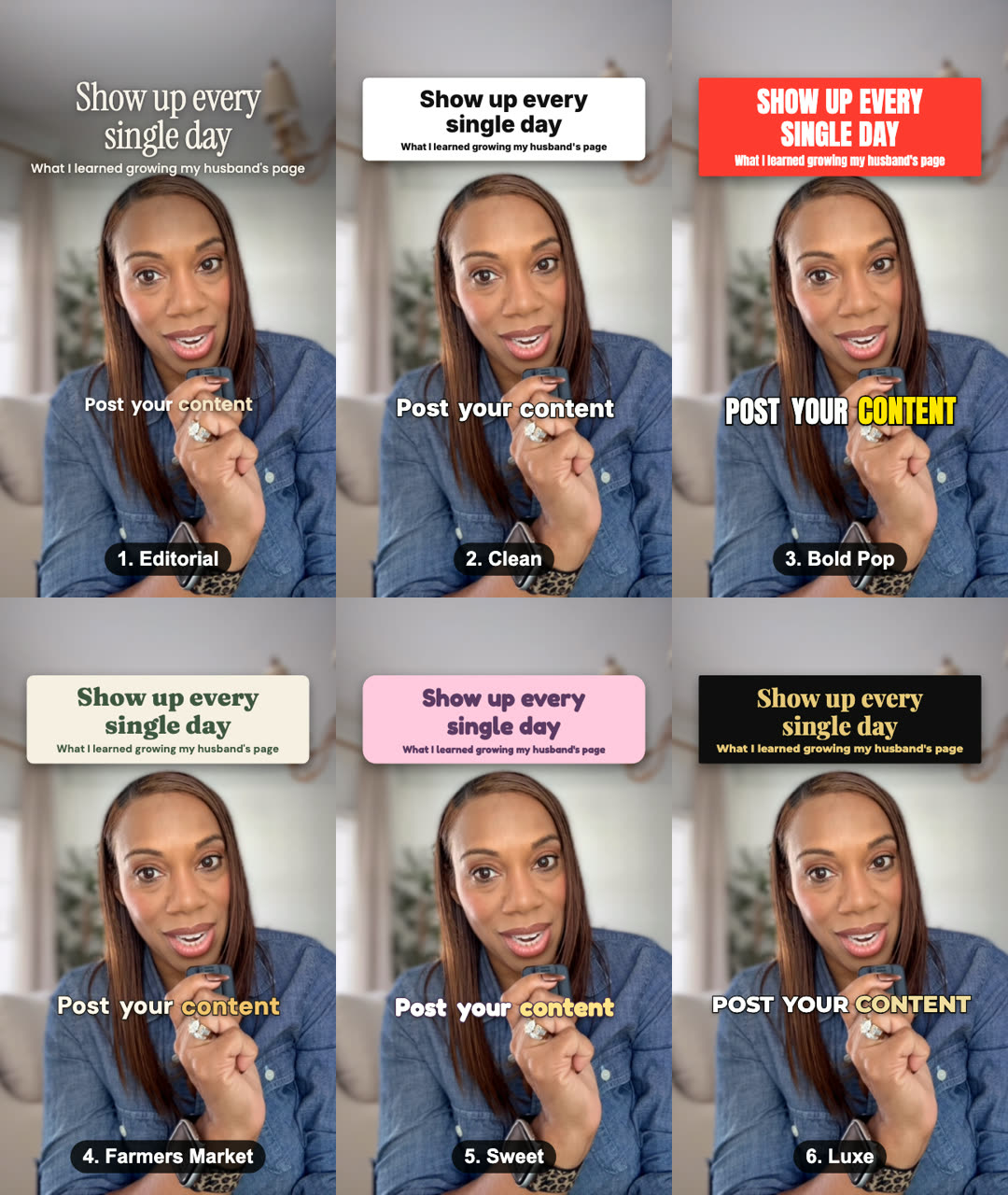
The same reel shown in six Edit Bestie styles: Editorial, Clean, Bold Pop, Farmers Market, Sweet and Luxe

What you need

Less than you think.

A Mac or a PC

Edit Bestie runs on your own computer, Mac or Windows.

The Claude app

Edit Bestie works inside the Claude desktop app, on a paid Claude plan.

Ten minutes, once

Setup is one sentence: "Set this up." It installs everything for you.

Your phone

Film the way you already do. No ring light or fancy mic required.

From Monique

"I made Edit Bestie because the hardest part of posting was never the filming. It was the editing. Now I film, I pour a cup of coffee, and my reel is ready when I am. It's like having a bestie who loves editing."

Monique WilsondebrianoCreator of Edit Bestie

Questions

Good to know

Do I need any editing experience?

None at all. You talk to Edit Bestie in plain words, the same way you would ask a friend for help. If you can send a text, you can use it.

Does it post for me?

No. Edit Bestie edits your reel and can write your caption, but nothing is ever posted without you. You stay in charge of what goes out.

Are my videos uploaded anywhere?

Your footage stays on your own computer. The speech-to-text that makes your captions runs right on your machine.

Does it use an AI voice or fake footage?

Never. Every reel is you, your voice and your footage. Edit Bestie only edits what you filmed.

Can I still use CapCut?

Yes. Ask for the CapCut version and you get the clean cut, the captions file and the sound effects, ready to finish by hand.

What does it cost?

Pricing is coming soon. People on the waitlist hear first, and get first access.

Be first in line

Join the Edit Bestie waitlist

Get first access, launch pricing, and a peek behind the scenes while we finish it.

No spam. Just Edit Bestie news, and you can leave any time.